When generating a proposal or order using the Compress identical weeks option, unexpected results can sometimes be produced. Weeks thought to be identical can be slightly different (week color, week title, etc.) and these differences can sometimes be difficult to spot and correct. To help with this issue, COMPASS has the Week Comparison Analysis.
From the Schedule Detail window, first switch the displayed week to the week to be compared. Then, click the Compare to Other Weeks button  on the tool bar to open the Week Comparison Analysis.
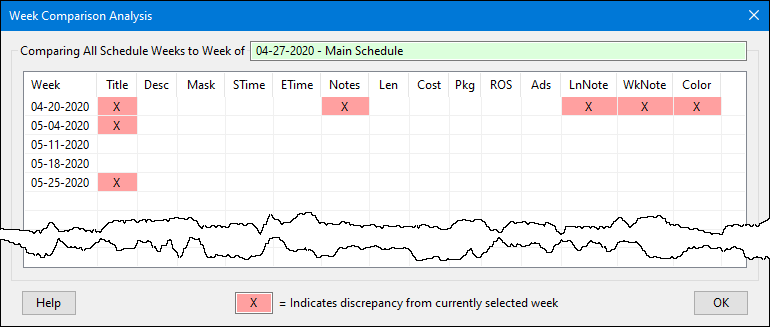
Week Comparison Analysis
All the weeks of a schedule are compared to the selected week. Each of the following elements is examined:
•Week title |
•Cost |
•Line description |
•Package |
•Line mask |
•ROS ads |
•Line start time |
•Monday - Sunday ads |
•Line end time |
•Line notes text |
•Line note numbers |
•Week note text |
•Length |
•Week color |
Any weeks of the schedule that differ in any of these areas from the selected week are marked with X . In the example above, the Line Note number for the week of 4-20-2020 is different from the selected week on at least one line of that week's schedule.