When working in the Schedule Detail window, both the Weekly Schedule and Multiple Weeks grids support Common Descriptions. This feature is designed to allow the rapid entry of program or schedule descriptions that are in common use (e.g., "Morning Drive", "Afternoon Drive", etc.) and are repeated often. It is available for both the initial and optional secondary description columns.
When adding a new line to either schedule grid, position the mouse pointer over a line in the first column and right click with the mouse. This displays a pop-up window with the common descriptions for the selected media. Each media type can have its own discreet description list. (Note: the pop-up description window will not appear if one or more entire rows have been selected for moving or inserting/deleting rows.)
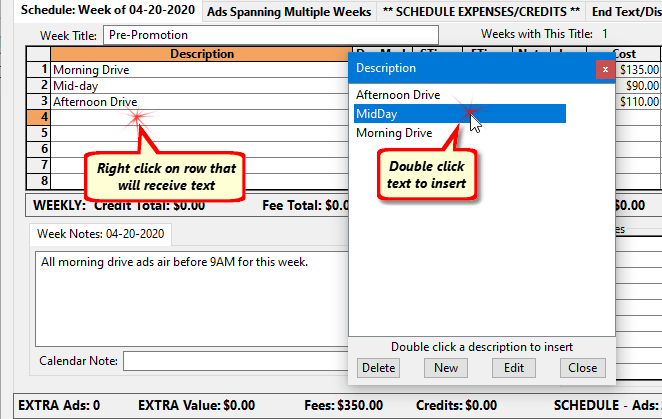
Inserting a Common Description
Double click the desired description in the list to insert it in the row where the right click occurred.
Adding a Description to the List
To add a new description to the list, click the New button on the pop-up window. This creates a blank entry in the list. Enter the new text to add, then press Enter. The new text is immediately available to be double clicked and added to the schedule. To abort the addition of new text, press Esc instead of Enter.
Editing a Description
An existing description can be edited by first highlighting it with a single mouse click, then clicking the Edit button. The remainder of the procedure is identical to adding new text to the list.
Deleting a Description
Any description can be removed from the list by highlighting it with a single mouse click and then clicking Delete. A confirmation window will ask for verification before the entry is deleted. Any text deleted from the list will not affect text previously entered into the grid.
Click Close to dismiss the pop-up window without adding text to the grid.