The Backup Options specifies the default settings for creating and maintaining backups of the COMPASS database. Loss of the database without a current backup can and often does prove to be catastrophic.
 Pro Tip
A good rule of thumb is: you can never have enough backups. We highly recommend enabling backup reminders, as any corruption of your database will result in total loss of your data. Making regular backups is vital to avoid this issue.
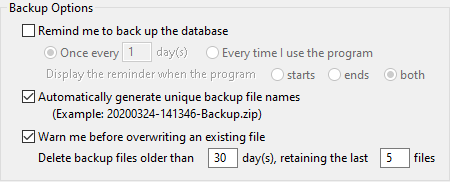
Backup Options
•Remind me to back up the database: Check this box to turn on COMPASS's option to display backup reminders. When checked, the following options become available.
▪Once every nn day(s): Specify the number of days between backup reminders. A setting of "1" displays a reminder each day. This setting produces a reminder only once per period, and is mutually exclusive with...
▪Every time I use the program: The backup reminder will be displayed each time the program runs, meaning the possibility of multiple reminders each day.
▪Display the reminder when the program starts/ends/both: Determines at what point the reminder is displayed. Selecting "both" will generate reminders when the program starts and again when the program terminates, but only when Every time I use the program is selected.
•Automatically generate unique backup file names: Supplies a date and time based backup file name to avoid accidentally overwriting a previous backup with the same name. The file name consists of the date in YYYYMMDD format and the time in HHMMSS format followed by "-Backup.zip" (e.g.: 20261122-130329-Backup.zip). This option is available only when the backup reminder is active. If this option is not used, COMPASS defaults to the name of the last backup file created. In either case, the program allows a different name to be manually specified.
•Warn me before overwriting an existing file: Check this box to be alerted if a previous backup with the same name is about to be overwritten. This option prevents the inadvertent destruction of an earlier backup. If the check mark is removed, no warning will be generated.
•Delete backup files older than nn day(s), retaining the last nn files: Mitigates the accumulation of excessive backup files. When COMPASS terminates, it examines the date of each backup file and removes any older than today's date minus the days specified. However, the last n number of files will always be retained regardless of date. Set the "older than" days to zero to disable this feature and retain all backup files for eternity or storage space is exhausted, whichever comes first.