If COMPASS's Reconciliation module is utilized, this section of Program Options controls the behavior of file selection and rotation discrepancy highlighting.
Reconcile Options
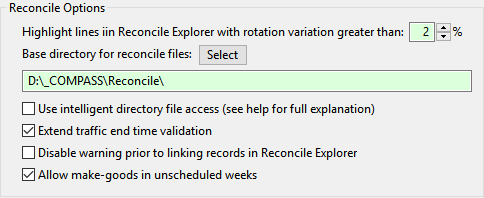
•Highlight lines in Reconcile Explorer with rotation variation greater than: In the Traffic Summary section of Reconcile Explorer, the traffic instructions desired rotation percentage is displayed along with the actual rotation achieved. If the actual rotation is outside of the percentage specified here, the displayed line is highlighted in yellow. Use the up/down arrows to adjust the desired percentage.
•Base directory for reconcile files: When reconciling schedules, COMPASS defaults to looking into the drive and directory specified here. Click the Select button to display a list of drives and select or create a folder where the reconcile source files from media should be stored. This directory should be accessible to all workstations on the network. Each workstation's path to that directory is set individually from each computer.
COMPASS creates additional directories under this base location according to the client, campaign, and media. Thus, if the base folder is C:\Reconcile and client XYZ Motors has a campaign named "Big Sale" that is broadcast on station "A", "B", and "C", the following folders will be created:
C:\Reconcile\XYZ Motors\Big Sale\A\
C:\Reconcile\XYZ Motors\Big Sale\B\
C:\Reconcile\XYZ Motors\Big Sale\C\
Place the media provided reconciliation files in the appropriate directory for each client, campaign, and media. When the reconciliation is performed, COMPASS will "know" exactly where to look to find the correct files. Without this feature, much mouse clicking would be required each time a reconciliation is performed to navigate to the correct file(s).
•Use intelligent directory file access: Checking this box allows COMPASS to use the directory structure described above to open the specific directory where reconciliation files are stored, provided you follow the above procedure. File locations are stored by client, campaign and media under the base directory. This means each time you want to reconcile a schedule for "Big Client"'s "Campaign A" on "Media X", the program will "know" to start in the proper directory.
This process will work automatically as long as the Use intelligent directory file access is checked. If you prefer to manually select files without the assistance of COMPASS, remove the check mark from this box.
•Extend traffic end time validation: During reconciliation, COMPASS considers an ad that is broadcast precisely at the End Time of the specified time span to be in error. For example, if the End Time for broadcast is 2:00 PM, an ad airing precisely at 2:00 PM would be flagged as an error. Check this box to extend the acceptable time to include the End Time when reconciliation takes place.
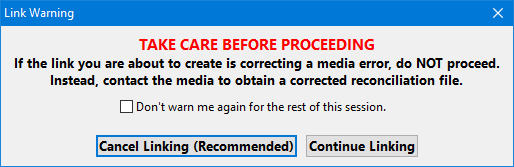
•Disable warning prior to linking records in Reconcile Explorer: When you elect to link unrecognized or error lines in the reconciliation process, COMPASS warns you of potential problems:
Link Warning
This message is designed to caution users unfamiliar with the need to link unrecognized reconciliation lines. If the link is being established to correct a media error, contact the media involved for a corrected reconciliation file. If the error is from your agency, then continuing is the proper course.
If the Disable warning prior to linking records in Reconcile Explorer is checked, this warning will not be displayed. This option is reserved for those individuals who are well-versed in the knowledge of how linking works.
•Allow make-goods in unscheduled weeks: Checking this box allows make-good ads broadcast in "empty" or unscheduled weeks to be reconciled. See Avoid Reconciliation Problems.