The PDF Options section controls certain aspects of how PDF's are saved and files are maintained.
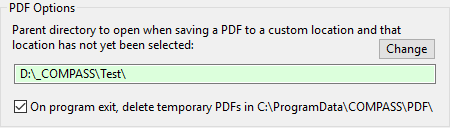
PDF Options
•Parent PDF directory: Allows a parent directory to be specified when saving a schedule in a custom directory. If a client does not have a previously selected custom directory, the Parent directory is where directory selection will begin. This can save a considerable amount of navigation each time you need to create a custom directory for a new client.
•On program exit, delete temporary PDFs: When a PDF is generated and no custom directory is specified (Shift is not depressed), COMPASS stores the PDF in a folder named C:\ProgramData\COMPASS\PDF\. Over time, this folder can acquire a large number of files. Place a check mark in the box to have COMPASS delete all PDFs in this directory each time you exit the program. None of the PDFs located in custom directories will be affected. This option is enabled by default.