In addition to deleting rows from a specific week's schedule, COMPASS provides the option of completely erasing selected weeks of a media's schedule, removing all ads, weekly comments, and weekly schedule notes.
With any week displayed in Schedule Detail, click on the Erase Weeks button  on the tool bar. This will display the Erase Selected Weeks dialog.
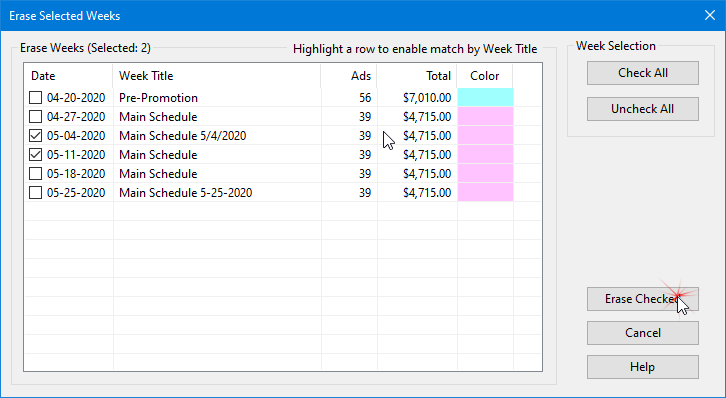
Erase Selected Weeks
When the dialog opens, all weeks of the schedule are displayed, including the currently active week. Place a check mark in the box next to each week to be erased. Click the Check All or Uncheck All buttons to check or uncheck all boxes, respectively.
Once selections are complete, click Erase Checked to erase those weeks or Cancel to close the dialog without erasing.
 Pro Tip
Highlight any week on the list by left clicking it with the mouse. This changes the Check All button to Check Matching. Clicking the Check Matching button will now place a check mark next to each week in the list that has a Week Title that matches the highlighted week.
Erase Selected Cells
The Erase Weeks button performs a different function if one or more cells of the schedule grid have been selected with the mouse.
With any week displayed, left click and hold on any cell of the schedule grid, then drag the mouse to highlight all the cells desired to be erased.
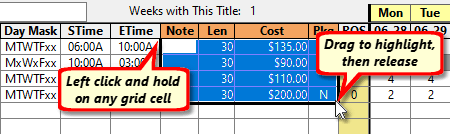
Selecting Cells to Erase
Once cells have been highlighted in this manner, clicking the Erase Weeks button instantly deletes the contents of those cells. If you delete by accident, click the Undo  button on the tool bar to restore the deleted contents.