A powerful tool provided by COMPASS is the interactive Adjust Schedule Dates window. When specifying the dates for a media schedule, this tool is available by right clicking either the start or end date field. This tool is always used when specifying the dates for a campaign.
Adjusting Schedule Dates Interactively
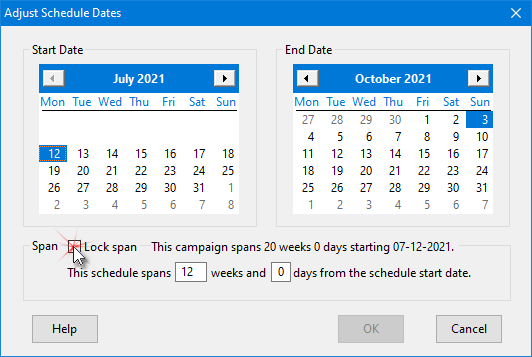
The calendars show the start and end dates for the campaign or schedule (depending on where the date tool was selected), and the text at the bottom of the window shows the number of weeks and days comprising the campaign/schedule.
In the example image above, the campaign spans from July 12 to November 28. The media schedule being edited runs for 12 weeks, from July 12 to October 3. The media schedule is limited by the campaign dates, so it is not possible to select a schedule start or end date outside the campaign dates.
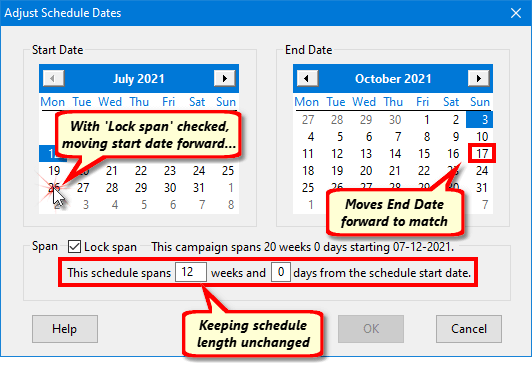
Click the Lock span box to constantly maintain the number of weeks and days in the schedule. With that box checked, changing the number of weeks or days immediately adjusts the End Date to match. Changing the Start Date adjusts the End Date and vice-versa, so the span of the schedule is always preserved at 12 weeks.
Changing Schedule Dates with Lock Span
If Lock span is not checked, changing dates in either calendar will cause the weeks/days to be updated to reflect the new schedule length, and the original span of weeks/days will not be maintained.
When working with a media schedule, the Start Date and End Date (as well as the weeks and days) are limited to the length of the campaign. Campaign dates are limited to a maximum of 53 weeks.