COMPASS can initially be used for a trial period of 60 days. After this evaluation period, the user must create a subscription to permit continued use. A subscription can be established selecting Help > Subscribe to COMPASS from the program's main menu, or by clicking on the gold key button  on the main window's tool bar.
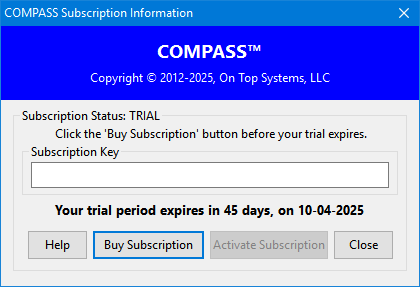
The Subscription Status section displays the current type of subscription (TRIAL or SUBSCRIBED), and when the current status expires.
Clicking the Buy Subscription button opens the computer's default browser to the COMPASS web site. Once there, select the subscription plan that best suits your need. Several payment methods are available and a PayPal account is NOT required.
Your subscription request is processed immediately and an email will be issued to the address you specified that contains your subscription key. Enter the subscription key in the Subscription Key field, then click Activate Subscription to complete the process.
The subscription will automatically renew from month to month, or year to year, depending on the plan selected. To cancel your subscription, return to this window. Your subscription key will be displayed along with a Cancel Subscription button. Click that button to proceed to the PayPal web site where you can log in and opt to discontinue your subscription.
If a subscription is canceled, access to COMPASS will continue until the expiration date of the current subscription period. Once that date is reached, the subscription must be reactivated in order to continue using the program.