The Logo/Heading section allows a graphic to be selected identifying the agency for inclusion on printed documents. This is optional and if no logo is selected the space normally occupied by the graphic will be eliminated from printed and emailed documents.
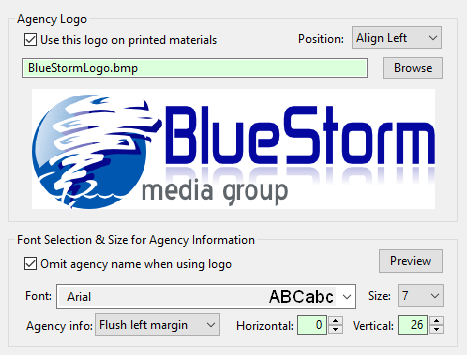
Agency Logo/Heading
•Use this logo on printed materials: Place a check in the box to activate use of the logo; remove the check to omit the logo without removing the logo selection from the Program Options window.
•Position: Select either of two options from the drop-down list for positioning the logo: Align Left, or Align Right. Align Left is the recommended setting.
•Browse: Click this button to open a file selection dialog where the logo file can be selected. All major graphic formats are supported (JPG, PNG, TIFF, BMP). The ideal size of the graphic is 420 x 120 pixels, but COMPASS will size larger graphics to fit within these dimensions. If the selected graphic is vertical (larger height than width), the image will be sized to retain its original proportions. However, the result might be smaller than desired on the printed page. Generally, images with a horizontal format, such as the example above, work best.
To substitute one logo for another, click the Browse button and make a new selection. To remove an existing logo without substituting a new one, right-click the logo with the mouse and confirm the logo is to be deleted.
Font Selection & Size for Agency Information
If a logo is selected for use on printed documents, this section of Program Options controls where the agency's information appears on the page.
•Omit agency name when using logo: If the logo contains the agency's name, checking this box will exclude the Agency Name field when printing.
•Font: Select the font style desired to print the agency's information. Select from any installed TrueType font available on the system. Note that the font selected will need to be installed on each local machine in order for it to be available throughout a networked environment.
•Size: The point size used to print the agency information.
•Agency info: Determines where on the page the agency information will be printed. Note that some options might be incompatible with the position of the logo (if used). The available options are:
oBeneath logo |
oCenter of page |
oLeft of logo |
oFlush left margin |
oRight of logo |
oFlush right margin |
•Vertical: The amount of vertical adjustment to make to the print position of the agency information. Each unit is equal to 1/72 inch (18 units = 1/4 inch). Values can be positive or negative.
•Horizontal: The amount of horizontal adjustment to make to the print position of the agency information. Values are the same as vertical adjustment.
Click the Preview button to see the result of these settings. Some back and forth adjustment might be required to achieve optimum results.