The Order Summary tab of Reconcile Explorer lists the schedule information for the reconcile period week by week as sent to the media. In addition to the original schedule specifications, a comparison of ads ordered to ads actually broadcast is shown, with any discrepancies highlighted in yellow. Use the arrow keys on the tool bar to move from week to week of the schedule.
If the option Allow make-goods in unscheduled weeks is enabled when reconciling, some of the weeks displayed in the Order Summary tab might be copied from other weeks in the schedule. The Week Status: label in the upper right corner of the tab indicates whether the week being displayed is "ORIGINAL" or a "COPY" required to handle make-good ads broadcast in weeks for which no ads were ordered. See Avoid Reconciliation Problems for more details.
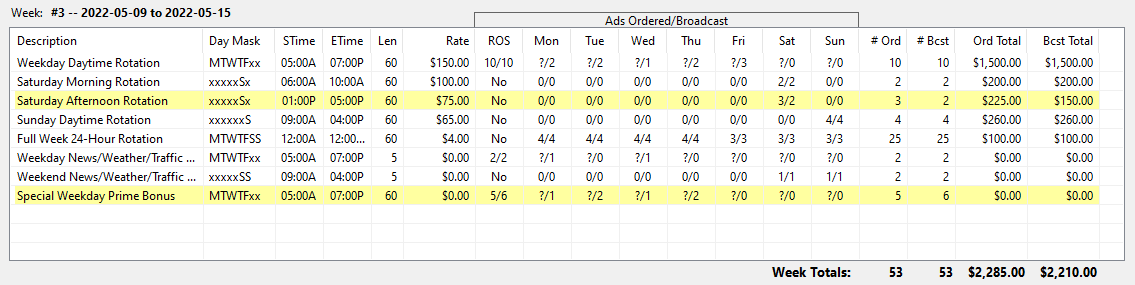
Reconcile Explorer Order Summary
The key section of this display is the section Ads Ordered/Broadcast. Each day of the week shows two values separated by a slash. The value before the slash is the number of ads originally ordered. The number following the slash is the number actually aired. The column ROS (Run of Station) either shows "No", meaning it is not ROS, or the ordered/aired information.
In the example above, the line "Special Weekday Prime Bonus" specified an ROS schedule of five ads for the week. However, the media broadcast six ads, resulting in the line being highlighted in yellow. Because the line is ROS, the number of ads scheduled to air on any given day is unknown, signified by a question mark.
Moving through the other weeks of the reconciliation period might reveal the number of ads for each line of each week vary as missed ads are "made good" or excess ads are accounted for by the actual ad count being reduced.
Also in this third week of the schedule, we see the line "Saturday Afternoon Rotation" is highlighted because of a missing ad. We need to examine the Order Detail tab of this window to determine if this is due to a detection error, and if so to resolve it.