COMPASS's Reconcile Explorer provides an in-depth examination of any differences between what was ordered and what was actually broadcast. This includes differences in the number of ads broadcast, days and times of each broadcast, and ad rotation.
To open a reconciliation in Reconcile Explorer, highlight it in Reconcile Schedules and then click the Edit button  or just double-click the line in the list.
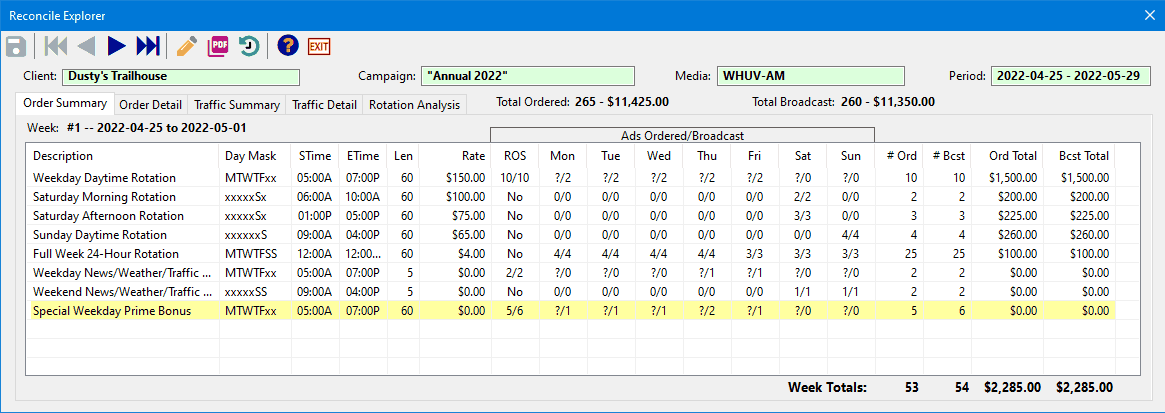
Reconcile Explorer
Tool Bar
|
— |
Save — Save all changes and notes from this reconciliation to the database. |
|
— |
First Week — Move to the first week of the currently opened reconciliation. |
|
— |
Previous Week — Move to previous week. |
|
— |
Next Week — Move to next week. |
|
— |
Last Week — Move to the last week of the currently opened reconciliation. |
|
— |
Reconcile Note Manager — Edit, delete, and clean up reconciliation notes. |
|
— |
Print — Generate a portion or the entire contents of Reconcile Explorer as a PDF document. |
|
— |
Traffic History — Generate a PDF showing all traffic instructions for the length of the campaign. |
|
— |
Help — Open the help file (this topic). |
|
— |
Exit — Close Reconcile Explorer. |


Information
Immediately below the tool bar the client, campaign, and media are listed. The fields Total Ordered and Total Broadcast contain the number of ads and investment ordered and broadcast, respectively.
The Reconcile Explorer displays details about the reconciliation in five tabs. They are:
Click on any of the above links for details.