Words can be added or deleted from the current spell check dictionary via the Spell Check Editor. The editor is selected from COMPASS's main menu under Tools > Spell Check Editor.
Adding Words
Enter the word to be added in the Word to Add or Delete box at the top left of the window. As characters are entered, all matches are displayed in the Dictionary Matches list.
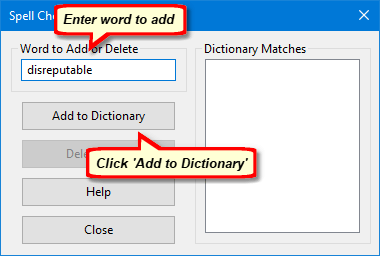
Adding Word to Spell Check Dictionary
When the full word is entered, the Dictionary Matches box will be empty if the word is not in the dictionary. Click Add to Dictionary to complete the addition. If the word being added is already in the dictionary, a notice will be displayed that duplicate words are not permitted.
Additional words can be added one at a time. Once additions are complete, click Close to save all changes and return to COMPASS.
Deleting Words
If an incorrectly spelled word is added to the dictionary, it can be removed by entering the word or a portion thereof in the Word to Add or Delete box. As each character is entered, all words that match what has been entered thus far are displayed in the Dictionary Matches box.
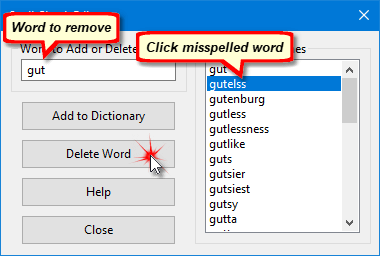
Delete a Word from Spell Check
Left click the misspelled word in the Dictionary Matches list, then click Delete Word to remove it from the dictionary. A message asking you to confirm the action ensures words won't be removed accidentally.
To maintain dictionary integrity, it is not possible to edit a misspelled word. The incorrectly spelled word must be deleted first, and then the correct spelling may be added.
Once changes are complete, click Close to save all changes.