When creating a proposal or issuing a broadcast order or traffic instruction, there are usually instructions or notations to the media. COMPASS features a number of options where details can be explained to assist media understanding. These include:
•Schedule Week Notes |
•Traffic Detail Comments |
•Multi Week Span Schedule Comments |
•Traffic Delivery Summary Comments |
•Schedule End Text |
•Traffic Instruction End Text |
•Schedule Disclaimer |
•Traffic Instruction Disclaimer |
While text for any of these areas can always be entered manually, COMPASS's Library Editor allows you to create text templates to standardize many frequently recurring instructions. Additionally, a selected template from each category can be designated as the default text that will always be selected when a new schedule or traffic is created.
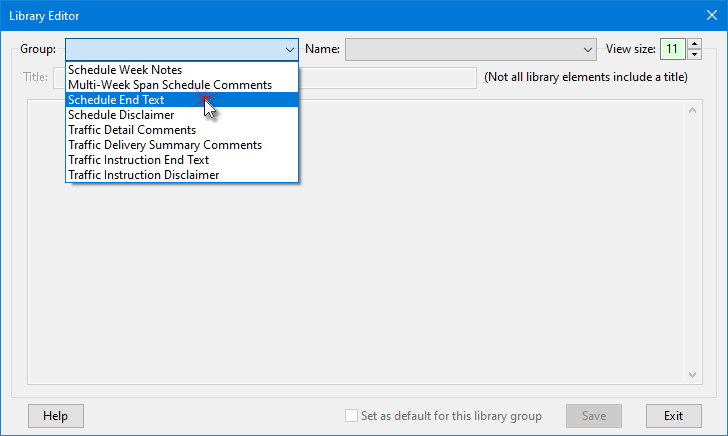
Library Editor: Select Library Group
On the Library Editor window left click the Library drop down to choose the group to be edited. Whatever group is selected will have existing templates for that group (if any) loaded into the group Name drop down list. Select any existing name from the list to load it for editing.
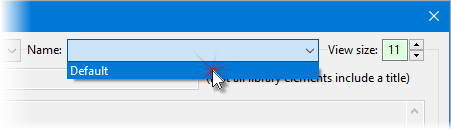
Selecting a Group Name
With a name selected, add or edit the title or body text as desired. Both the title and body text supports Text Substitution and Spell Check.
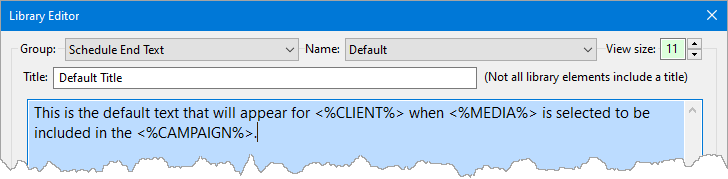
Editing Text
Add, Edit, Delete Names
To add a new group Name, or edit or delete an existing one, right click the Name drop down and choose the desired action. Each Name within a group must be unique (no duplicates). Switching to a different Name loads the title and text for that name for editing.
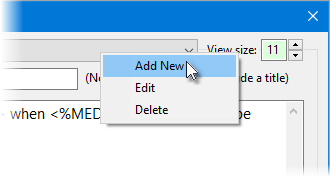
Add, Edit, Delete Name
To make the selected template the default for that group, check the box at the bottom of the window: Set as default for this library group. Each group may have only one default template. If a new template is marked as default, it replaces the current default. Removing the check from the current default means no template will be selected for that group when the next schedule/traffic is created.