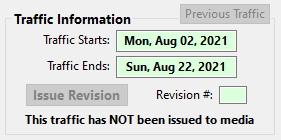
This section of the Traffic Instructions window provides information on the start and end dates of the traffic, plus options to issue revisions or roll back to previous traffic.
Traffic Information
The dates shown are not editable, but initially reflect the start and end dates of the campaign. As traffic information is entered and saved in the Traffic Detail section, the dates shown are updated to reflect the start and end of the actual traffic. These dates can optionally be within the span of the campaign and do not have to span the entire campaign.
Once the start date of the traffic has been reached, the background of the Traffic Starts field will turn pink, indicating that the traffic is now active.
Issue Revision
Once traffic has been issued to media, the Issue Revision button will be enabled if the traffic start date has not yet occurred. During this period, if changes to the traffic instructions are required, click the Issue Revision button before making any modifications. This will advance the Revision # field and allow the media to determine the instructions override what was previously issued.
Once the ads indicated in the current traffic instructions have begun to be broadcast, no revisions can be made and the Issue Revision button will be disabled. Instead, New Traffic must be issued to deal with any modifications to the traffic schedule.
The bold text immediately below the Issue Revision button indicates the status of the traffic. It will show either "This traffic has NOT been issued to media" or "This traffic HAS been issued to media". The traffic status also affects other aspects of the Traffic Instructions window.
Previous Traffic
In the event new or revised traffic is created by accident, the Previous Traffic button allows the just created traffic to be discarded, "rolling back" to the prior set of traffic instructions.
The Previous Traffic button is only available when new/revised traffic has been created but not yet issued to media. Immediately after the instructions have been issued, the Previous Traffic button is disabled.