A blank broadcast calendar (showing no client or schedule information) can be printed at any time from the main COMPASS menu. This can be beneficial for planning purposes when a campaign has yet to be created. Select Tools > Blank Broadcast Calendar from the menu to display the Blank Broadcast Calendar Options window.
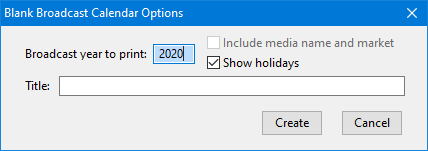
Blank Broadcast Calendar Options
The Broadcast year to print: defaults to the current year; enter any four-digit year desired from 1920 to 9999.
When called from the main menu, the check box Include media name and market is disabled. This option is available when the calendar is called from the Campaign Information or Schedule Information windows.
Check the box Show holidays if it is desired for holidays to be included. Depending on the number of holidays in the database, several moments can be required for holidays to be included.
The Title: field is optional and can consist of any text description desired.
Click Create to generate the calendar, or Cancel to close the window and exit.