The Agency's Client Rep section of the Campaign Information window contains information about the individual who is the primary contact between the agency and the client.
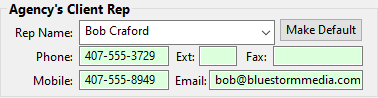
Agency Client Rep Detail
Adding a New Rep
Enter a new name in the Rep Name field to create a new representative, just as for a new client. Each representative name must be unique; the program will object if a name is entered that is already on file.
Beyond the representative's name, all other information is optional. Note that if an address for the Email field is omitted, this information will have to be entered manually when originating an email from within COMPASS.
Once a representative has been entered and saved, that representative can be selected from the drop down list when a new campaign is created. Selecting a representative automatically fills in all the available information associated with that individual.
Editing Rep Information
Any of the displayed information can be edited as desired. Right-click the representative name to open the Agency Representative Information window. This window allows the editing of all the displayed information, plus the opportunity to add a signature file.
The signature file is used on media schedules if the option to include an agency signature is selected. Click the Browse button to select a signature file. The file will only be used if the Use selected signature image is checked. To remove a signature assignment, right-click the signature area and click OK when the confirmation window appears.
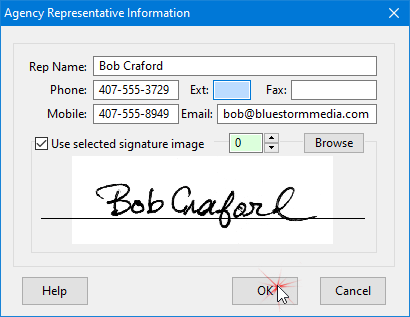
Agency Rep Information
Signature files should consist of high-resolution (300 DPI) scanned signatures. For best contrast, signatures should be in bold black ink on unlined white paper. Once the signature file is loaded, use the up/down arrow keys next to the Browse button to align the line on the window with the signature. This enables the software to adjust the signature placement on the printed schedule.
Assigning a Default Rep
If the agency's client representative is permanently (or usually) assigned to a this client, that person can be assigned as the default rep for the client. This means that each time a campaign is created for this client, the assigned representative will automatically be selected.
Making the default assignment is as simple as clicking the Make Default button on the Agency's Client Rep section. Making this assignment will not affect any existing clients/campaigns, and this default choice can be overridden at any time by selecting a different representative for a particular campaign. If the Make Default button is unavailable (grayed out), it means the name displayed is already the default representative for that client.