The General Preferences category of Program Options controls the appearance of certain features and some program actions.
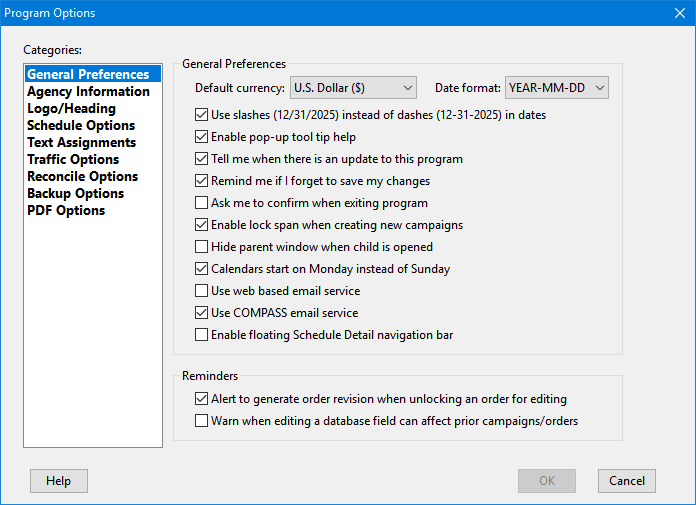
General Preferences Section
•Default currency: Determines the currency formatting that appears throughout the program and the "default" setting when a new media is created. This setting can be overridden as required for each media individually. This setting defaults to "U.S. Dollar ($)".
•Date format: Controls how dates are formatted throughout the program as well as the "default" date format when a new media is added to the program. The date format for each individual media can be adjusted as needed and that setting will be reflected on its printed schedules. This setting defaults to "MM-DD-YEAR" (e.g.: 12-31-2025).
•Use slashes (12/31/2025) instead of dashes (12-31-2025) in dates: Alters the appearance of dates throughout the program.
•Enable pop-up tool tip help: When selected, hovering the mouse over most controls on the program window will produce a pop-up box with a brief explanation of that control's function. Remove the check from the box to turn this feature off.
•Tell me when there is an update to this program: When checked, COMPASS will automatically display a notification when an updated version of the program is available for download from our web site. This check can also be performed manually by selecting Help > Check for Program Update from the main menu. This function requires a working Internet connection in order to operate. No personal information is transmitted when this check is performed.
•Remind me if I forget to save my changes: Check this box to have the program display a reminder to save any changes not already saved before exiting any window. If the check mark is removed, no reminder will be displayed (and any unsaved changes will be lost).
•Ask me to confirm when exiting program: When this box is checked, closing the program will ask you to confirm your action. This can be handy if you are exiting by accident. Remove the check from this box to allow the program to close without asking for confirmation.
•Enable lock span when creating new campaigns: When this box is checked, new campaigns will be created with the "Lock span" box checked. Lock span maintains the span (weeks and days) of a campaign when the campaign start or end date is modified in the Adjust Campaign Dates window. This option is enabled by default.
•Hide parent window when child is opened: Under normal operation, each new window opened in COMPASS appears on top of previous windows. If you would like to hide the previous windows to reduce desktop clutter, check this box. This feature can also be toggled from the main COMPASS window by pressing Ctrl + H on the keyboard.
•Calendars start on Monday instead of Sunday: This setting actually applies to all calendars in the program. When not checked, calendar weeks start on Sunday.
•Use web based email service: Allows users who use an Internet based mail service (Yahoo, G-Mail, AOL, etc.) to obtain the information necessary to send proposals/schedules/traffic instructions via email. Leave this unchecked if using a local email client such as Outlook, Thunderbird, Pegasus, etc.
•Use COMPASS email service: Use the built-in COMPASS email application in place of your default email client. See COMPASS Mail for more information. This option is not available if Use web based email service is checked.
•Enable floating Schedule Detail navigation bar: Selecting this option transfers the Schedule Detail navigation buttons (changing from week to week) from the tool bar at the top of the Schedule Detail window to a "floating" tool bar that can be moved anywhere on your desktop.
Reminders
•Alert to generate order revision when unlocking an order for editing: When this box is checked, unlocking an order on the Schedule Detail window that has been issued to media displays a reminder that such orders should not be modified until a revision has been generated. Remove the check from this box to disable this reminder.
•Warn when editing a database field can affect prior campaigns/orders: Some changes to the database can affect existing campaigns and/or orders. Check this box to have a reminder displayed if COMPASS detects such a condition.