COMPASS supports text substitution in many campaign-level and schedule-level text sections, as well as in the Library Editor. Text substitution involves inserting a "placeholder" element in the text that is later substituted by the relevant text, typically the name of the client, media, campaign, or date information
To enter a placeholder, position the cursor in the text where the placeholder should appear, then right click with the mouse. Click the desired placeholder in the pop up list. To cancel the addition, left click away from the pop up to close it without entering a placeholder.
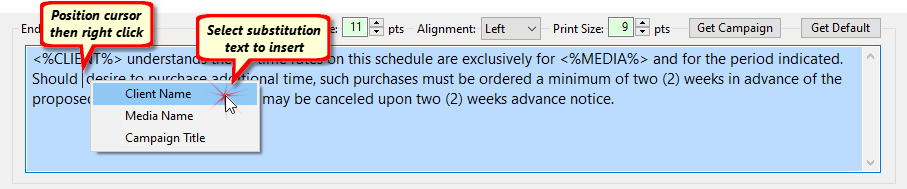
Text Substitution Example

End Text with Substitutions
Keyboard shortcuts are also available:
Alt + C: |
Client Name |
Alt + M: |
Media Name |
Alt + T: |
Campaign Title |
Alt + S: |
Start Date |
Alt + F: |
Full Start Date |