Some sections of COMPASS operate and appear differently when logged in to the network. The most noticeable of these is the appearance of the Client Detail section on the Campaign Information window.
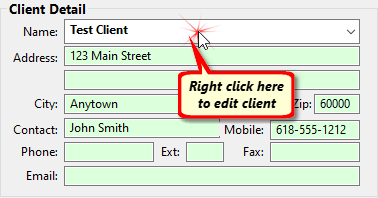
Editing a Client in Network Mode
When in network mode, the client information is not directly editable. This is immediately obvious in that the detail fields appear with a green background. The data fields are locked and cannot be edited.
Instead, to modify the phone, email, or any other information, it is necessary to right click the Client Name field. This will display a separate client information window where changes can be made.
The reason for this difference is because COMPASS must prevent multiple users from editing the same database record at the same time. This safeguard is accomplished through what is known as record locking.
When a campaign is opened in the Campaign Information window, the client displayed is not locked. This enables other users to also work on the same campaign or another campaign for the same client. However, if the Client Detail is opened for editing (by right clicking the client name), that client record is locked. Other users on the network will be unable to edit the Client Detail for that client until the user that locked the client record completes editing.
Switching back to local mode removes this limitation and all data for a client can be edited directly. However, any changes made to the local database are only effective locally and will not appear in the network database.