Each media schedule in a campaign is assigned a status. This shows at a glance if the schedule is a:
•Proposal: The schedule has been created but not yet approved by the client;
•Order: The schedule has received client approval and can now be forwarded to the media.
Each schedule defaults at creation to proposal status.
From the Campaign Information window, a proposal may be copied, generating additional proposed schedules to provide multiple strategies for the client. Proposals for each media begin with the number "1" and are incremented (e.g., following proposals will be "2", "3", "4", etc.).
Renumbering Proposals
In some cases, multiple proposals might be generated for a media, with some of them later discarded. This can lead to a condition where the proposals might be numbered "1", "2", and "4" (proposal "3" having been deleted). To avoid the client experiencing confusion over the non-sequential numbering, COMPASS gives you the option of renumbering proposals to eliminate such a gap.
Open the proposed schedule to be renumbered in the Schedule Detail window, then press Ctrl + F8 on the keyboard. This will open the Reset Proposal Number window.
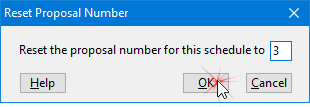
Reset Proposal Number (Ctrl + F8)
In this example, we've opened Proposal #4 and are changing it to Proposal #3. Click OK, then confirm you want to complete this change to make it effective.
The program will not allow the assignment of a number that conflicts with an existing proposal. If only one proposal for the media is present, the Ctrl + F8 key press is ignored. See Keyboard Shortcuts.
Switching from Proposal to Order
See Convert to Order.