Each schedule and traffic instruction created in COMPASS can optionally feature default text segments. These text comments typically provide additional details applying to the schedule or traffic, such as terms and conditions, limitations, special instructions, etc. The disclaimer section is usually reserved for notifications required by the legal department (if any).
The Text Assignments section allows the designation of the default text that will occupy these positions for various aspects of the schedule and traffic. The default for each is selected from the associated drop down list. The actual text is created and edited in the Library Editor which can be accessed by clicking the Library Editor button. All of these sections support text substitution.
Initially, each of the default selections is set to None. Regardless of these settings, text for these areas in the actual schedule/traffic can be entered or edited manually at any time after creation.
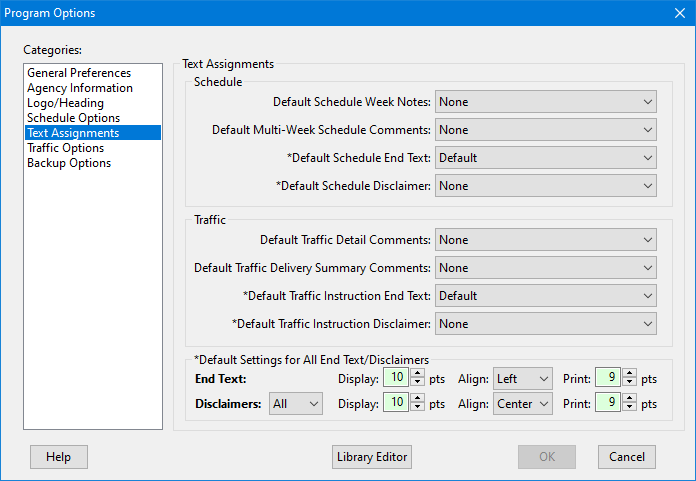
Default Text Assignments
Schedule
•Default Schedule Week Notes: The default text that appears in the Week Notes section for each week of the schedule's "regular" weeks.
•Default Multi-Week Schedule Comments: The default comments for Multi-Week schedules.
•Default Schedule End Text: Text comments that appear at the end of the schedule. This is the area typically used for special instructions, or details about a revision or cancellation.
•Default Schedule Disclaimer: Text that appears at the end of the schedule, typically in smaller text on the final page.
Traffic
•Default Traffic Detail Comments: Text that appears at the end of the Traffic Detail section of traffic instructions.
•Default Traffic Delivery Summary Comments: Text that appears following the Traffic Summary section of traffic instructions.
•Default Traffic Instruction End Text: Text that appears at the end of the traffic instructions.
•Default Traffic Instructions Disclaimer: Text that appears at the end of the traffic instructions, typically in smaller text on the final page.
Default Settings for All End Text/Disclaimers
This section allows for the default settings for both End Text and Disclaimers for both schedules and traffic. These settings include the on-screen display size of the text, and the text alignment and font size when printed. For disclaimers, the default printing on all pages or only the final page can be specified. Each of these settings may be modified as desired on each schedule and/or traffic instruction.